

Copy Trading Guide For Lead Traders
Copy trading is an investment strategy in cryptocurrency trading that allows investors to automatically replicate the trades of experienced traders. For beginners with limited knowledge or trading experience, copy trading provides a user-friendly way to participate in the market. For experienced traders, you can apply to become a lead trader, allowing you to earn profits from your own trades while also receiving profit shares.
1. How to Become a Lead Trader?
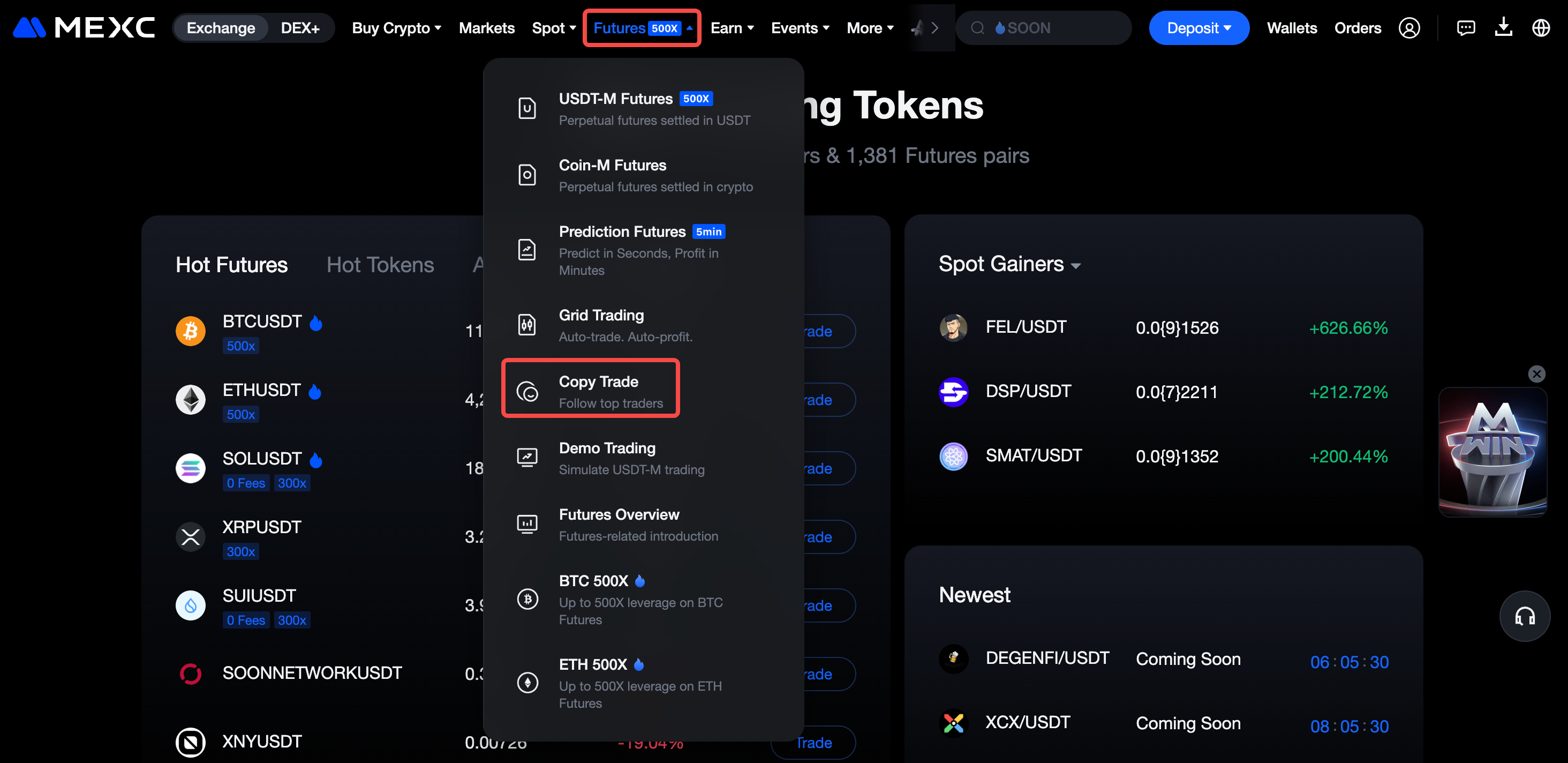
On the MEXC official website, go to Futures → Copy Trade, and enter the copy trading page.
Once on the Copy Trade page, click Become a Trader.
Follow the on-screen instructions to verify if the email is the one registered to your account. If no email is registered, you will need to provide one to receive important updates, such as the review status for becoming a trader. Except for the email, which is a required field, the Telegram account and mobile number details are optional, and you can choose whether to fill them in based on your needs.
After checking the Trader Agreement box, click Submit and wait for the review results. MEXC will send the application results and notify you of the outcome via email, internal message, or SMS within 1-2 business days. Once approved, you can begin copy trading.
Note: When applying to become a trader, you cannot follow any lead traders. If you are currently following any, please cancel and stop following them before submitting your application. Once you become a trader, you will no longer be able to follow other lead traders.
2. How to Start Copy Trading
After becoming a Trader, go to the copy trading page, and click on the > icon to access your personal copy trading page.
On the My Lead Trades page, you can view your lead trade stats, profit-sharing stats, your followers, watchlist, and make customizations under Setup such as your nickname, bio, avatar, and copy trading pairs.
2.1 Choose Your Copy Trading Mode
MEXC allows users share trades in two ways:
- Public: Anyone can see and follow your trades
- Private: Only invited users can see your trades. Not visible to the public, and you can change this setting once a day.
In Private mode, you can set your profit share to up to 50%.
When you enable Private Copy Trading, users may choose one of the following options:
1) Allow all users to follow your trades as long as they have your invitation link or code
2) Only allow users who signed up with your referral code to follow your trades
Reminder:
1) Traders who choose this option will not appear on the Copy Trade main page, Followers list, or Top Traders list. However, users can still find them via search.
2) Only invited users can follow the trader's trades. Users who find the trader via search will still need to enter the correct referral code to copy trades.
3) If the trader already has Followers, they must cancel them before switching to Private mode. Switching is not possible if there are active Followers.
4) After switching between Public and Private modes, no further changes can be made for the rest of the day.
Once Private mode is set, the trader can go to the My Followers page and click Invite Now.
On the Private Invitation page, click Create Link, fill in the Invitation Message and number of invites, select the invitation scope, and then click Confirm to generate your exclusive invitation link. Invited users can follow you and start copy trading through this link.
2.2 Configure Copy Trading Settings
On the My Lead Trades page, click Setup. You can toggle the lead trade feature on or off, allow or restrict followers, enable the option for only referred users to follow, and make position history records visible only to followers. You can also set your avatar, copy trading pairs, nickname, and bio. Once done, click Submit to apply the changes.
Key Terms Explained:
- Lead Trade: When enabled, your followers will be able to follow your trades.
- Allow Following: Turning off this option means new users cannot follow you; turning it on allows them to follow.
- Only My Referrals Can Follow: When turned off, all users can follow you. When turned on, only users you invite can follow.
- Only Followers Can View Position History: When enabled, only followers can view your current and historical position records.
Please note that the copy trading feature currently supports only USDT-M Futures in hedge mode. The maximum leverage allowed varies depending on the Futures trading pair. Please refer to the displayed information on the page for the exact details.
2.3 Start Copy Trading
Once you've completed the setup for your copy trading details, click the Initiate Trade button on the page. A Valid Lead Trade Conditions pop-up will appear, where you can view your Current Pairs and see the remaining number of Available Lead Trades. Note that your total Futures account equity must not be less than 100.00 USDT.After confirming everything is correct, click Confirm to be redirected to the Futures trading page.
If you select Never Show Again, the Valid Lead Trade Conditions pop-up will no longer appear the next time you click Initiate Trade. Instead, you'll be taken directly to the Futures trading page.
Based on the copy trading pair you've set, such as BTCUSDT, open a position on the Futures trading page. Once the position is opened, return to the My Lead Trades page. Within the Lead Trade Stats section, under Current, you'll be able to see the newly created order.
Click Close, and both your position and your followers' positions will be closed at the market price, completing the copy trade. If the trader partially closes a position, the corresponding copy trades of the followers will also be partially closed based on the trader's closing ratio.
2.4 View Copy Trade History
On the My Lead Trades page, click History under Lead Trade Stats tab to view your copy trade history.
3. Managing Followers
On the My Lead Trades page, click My Followers to view your current followers, time followed, and total equity in the Copy Trading account. To temporarily exclude a follower, under Action click Exclude. Please note that you can only remove a follower if they have no open positions and their total equity is less than 5 USDT.
You can request an increase in the follower limit once the number of followers reaches 900.
If you don't want any followers to follow you, you can disable the Allow Following option in the Setup tab.
4. How to View Profit Sharing
On the My Lead Trades page, click on Profit Share Stats to view your profit-sharing details.
Profit Sharing Rules: Profit sharing is settled at 00:00 (UTC+08:00) each day, covering the previous 24 hours. The settlement period runs from 00:00 the previous day (UTC+08:00) to 00:00 the current day (UTC+08:00). Profit sharing only applies if followers' total profit or loss during the period is positive.
Profit Share Ratio: The default sharing percentage is 10%. You can apply to modify this percentage, but you can only make one change per day.
5. How to Deactivate Your Trader Account
On the My Lead Trades page, click Setup, scroll to the bottom, and click the > button next to Revoke Trader Status. In the confirmation pop-up, click Confirm to deactivate immediately.
Please note that deactivating your trader account requires meeting the following conditions:
1)The Lead Trade Function must be disabled in My Lead Trades → Setup.
2)You must have no active lead trade positions.
3)There must be no pending profit share distributions.
The process on the MEXC App is similar to the Web version. Simply open the MEXC App, tap More → Futures → Copy Trade to enter the copy trading page. After successfully applying to become a trader, you can begin copy trading.