Avoiding Configuration Bleed: Cleanly Separating Staging and Production on Netlify (in a Monorepo)
The first time I pushed a staging build live on Netlify, I thought everything looked flawless — until during testing I noticed production users were suddenly hitting staging APIs. If you’ve ever felt your stomach drop at that kind of mistake, you know how real “configuration bleed” is. This article is my attempt to distill hard lessons learned into a strategy for keeping staging, production, and everything in between completely isolated. After experiencing these mishaps managing deployments on Netlify, I have learned the platform’s flexibility can become a liability when we don’t establish clear boundaries between environments.
Configuration bleed is not just an inconvenience - it’s a security vulnerability waiting to happen. With this misses you might accidentally expose staging API keys in production, leak sensitive user data between environments, and push untested features to live users.
What is Netlify?
Netlify is essentially a deployment pipeline bundled into a developer-friendly platform. At its core, it takes your code from a Git branch, runs your build commands, and instantly publishes a live version of the app. What makes it attractive to many teams is the removal of infrastructure headaches — you don’t manage servers or worry about CI integrations. Instead, you get a system where commits can translate almost immediately into working previews or production-ready deployments.
The Hidden Dangers of Poor Environment Separation:
When environments blur together, the problems don’t just stay technical — they ripple into security and user trust. A few scenarios I’ve personally seen (or narrowly avoided):
- Misplaced credentials: It’s surprisingly easy to have a staging API key sneak into a production deploy. Suddenly, your staging environment isn’t private anymore.
- Polluted datasets: A developer running test credit card numbers against a live database can corrupt real analytics and break dashboards.
- Half-baked features in the wild: A toggle misconfigured in staging can expose incomplete functionality to paying users, creating confusion or support overhead.
- Cross-origin risks: If you don’t explicitly limit CORS origins per environment, your APIs may start accepting calls from unintended domains.
From a maintenance perspective, configuration bleed creates operational nightmares:
- Debugging complexity: When environments are not properly isolated, tracking down issues becomes hard
- Rollback complications: Mixed configurations make it hard to cleanly revert problematic deployments
- Testing unreliability: Staging environments that do not mirror production environment accurately result in false confidence
The Root Problem: Single-Site Thinking
As a developer when we start with Netlify we create a single site connected to the main repo branch. This works perfectly for simple projects, but as applications grow and the complexity grows, this approach becomes problematic. The inclination will be to use Netlify’s context-based configuration to handle different environments within the same site, but this creates shared state that inevitably leads to configuration bleed.
The fundamental issue is treating environments as configurations rather than completely separate deployments. As a developer when one thinks of staging and production as different versions of the same site, naturally they will inherit all the coupling problems that come with the shared infrastructure.
The Solution: True Environment Isolation
After countless hours debugging configuration issues, I have settled on a simple principle: separate sites per environment. This means creating distinct Netlify sites for production, staging, and any other long-lived environments you need.
Here’s why this approach is superior:
Security Benefits:
- Complete isolation: Environment variables, build settings, and deployment configurations remain completely separate
- Principle of least privilege: Each environment has access to its specific resources
- Audit trails: Clear deployment history per environment makes security reviews straightforward
- Credential separation: No risk of staging credentials accidentally being used in production
Maintenance Advantages:
- Independent deployments: Roll back production without affecting staging, or experiment in staging without production concerns
- Clear resource boundaries: No confusion about which database, API, or third-party service an environment should use
- Simplified debugging: When issues arise, you know exactly which environment and configuration are involved
- Team workflow clarity: Developers can work on staging without the risk of impacting production
Recommended Architecture:
Site Structure:
Create two separate Netlify sites:
- Production site: connected to
mainorproductionbranch - Staging site: connected to
stagingordevelopbranch
Each site should have its own:
- Domain configuration
- Environment variables
- Build settings
- Deploy notifications
- Access controls
Configuration Strategy:
Here’s a stripped-down netlify.toml example I use in a monorepo. It’s adapted from Netlify’s own docs, but tweaked to clarify environment-specific overrides:
\
toml [build] #Set frontend app folder (for monorepos) base = “frontend” command = “npm ci && npm run build” publish = “frontend/dist” [build.environment] NODE_VERSION = “20” #Environment-specific API endpoints: [context.production.environment] API_BASE_URL = "https://api.example.com" FRONTEND_ORIGIN = "https://app.example.com" [context.staging.environment] API_BASE_URL = "https://api-staging.example.com" FRONTEND_ORIGIN = "https://staging.example.com" [context.deploy-preview.environment] API_BASE_URL = "https://api-preview.example.com" FRONTEND_ORIGIN = "https://deploy-preview-<id>--example.netlify.app" # Essential SPA fallback to prevent 404s on route refresh [[redirects]] from = "/*" to = "/index.html" status = 200 \ Environment variable management:
Store environment variables directly in each site’s Netlify dashboard, not in netlify.toml . This includes:
- API keys and secrets
- Database connection strings
- Feature flags that control sensitive functionality
Public configuration like API base URLs can live in netlify.toml for transparency, but anything sensitive should be isolated per site.
Backend CORS Configuration:
To prevent unintended cross-environment API access, I rely on a CORS setup derived by FastAPI’s guide but customized for deploy previews:
from fastapi.middleware.cors import CORSMiddleware import os # Environment-specific allowed origins allowed_origins = [] if os.getenv("ENVIRONMENT") == "production": allowed_origins = ["https://app.example.com"] elif os.getenv("ENVIRONMENT") == "staging": allowed_origins = ["https://staging.example.com"] elif os.getenv("ENVIRONMENT") == "preview": # For deploy previews, pattern match allowed_origins = ["https://deploy-preview-*--example.netlify.app"] app.add_middleware( CORSMiddleware, allow_origins=allowed_origins, allow_credentials=True, allow_methods=["GET", "POST", "PUT", "DELETE"], allow_headers=["*"], ) This approach ensures that your staging API cannot be called from production (and vice versa), preventing data leakage and unauthorized access.
Deployment Flow Architecture:
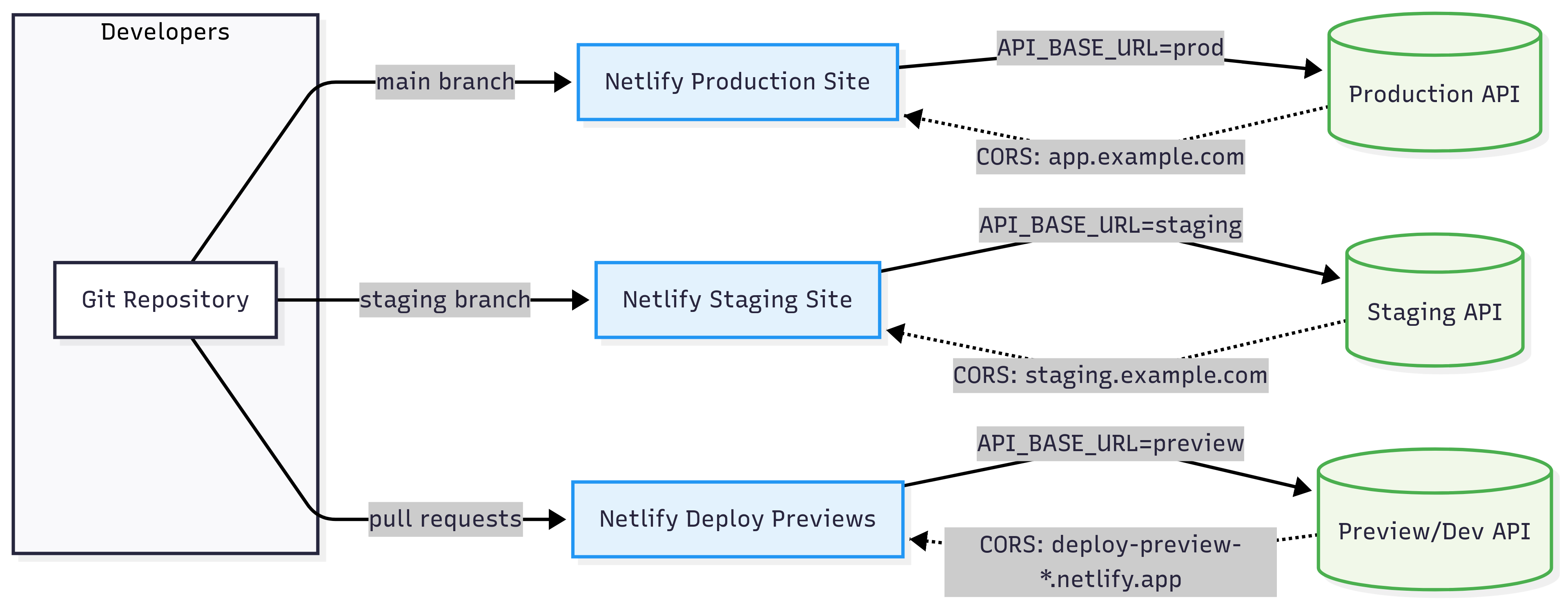
This architecture ensures complete isolation between environments while maintaining clear data flow and access controls.
\ Common Pitfalls and Solutions:
- Monorepo Configuration Confusion:
- Problem: In monorepos, Netlify might build from the wrong directory or publish incorrect files
- Solution: Explicitly set
baseandpublishdirectories for each site. Do not rely on Netlify’s auto-detection
[build] base = "packages/frontend" # Explicit path to app publish = "packages/frontend/dist" # Explicit publish directory -
Environment Variable Source Confusion:
-
Problem: Variables defined in both
netlify.tomland the Netlify UI, causing unexpected overwrites. -
Solution: Establish a clear hierarchy and documentation:
- Public config →
netlify.toml - Secrets → Netlify UI per site
- Document which variables live where
- Public config →
-
Hard-coded URLs in Application Code:
-
Problem: hard-coded API endpoints, making environment separation ineffective.
-
Solution: Always use environment variables for external resources:
// Bad const API_BASE = 'https://api.example.com'; // Good const API_BASE = process.env.REACT_APP_API_BASE_URL || 'http://localhost:3001'; -
Forgetting Deploy Preview Origins:
-
Problem: Deploy previews fail CORS checks because backend doesn’t allow their dynamic URLs.
-
Solution: Either configure pattern matching for preview URLs or disable deploy previews for sensitive projects:
# Pattern matching for deploy previews import re allowed_origin_patterns = [ r"https://deploy-preview-\d+--yoursite.netlify.app" ] def is_allowed_origin(origin): return any(re.match(pattern, origin) for pattern in allowed_origin_patterns) Maintenance Workflow Benefits:
Once properly implemented, this separation strategy provides significant operational advantages:
-
Faster Debugging: When issues arise, you immediately know which environment and configuration set to examine. No more wondering if a production issue is caused by staging configuration bleed.
-
Confident Deployments: With true environment isolation, you can deploy to production knowing that staging testing was performed against identical infrastructure and configuration patterns.
-
Easier Rollbacks: Each environment maintains its own deployment history, making rollbacks surgical and predictable.
-
Team Collaboration: Multiple developers can work on different features in staging without stepping on each other’s toes or affecting production stability.
Beyond Basic Separation:
As your application grows, consider additional environment separation strategies:
-
Feature-branch environments: Temporary Netlify sites for long-running feature development
-
Load testing environments: Separate infrastructure for performance testing
-
Security testing environments: Isolated environments for penetration testing and security audits
-
Client demo environments: Stable environments for customer demonstrations
Looking back, every major “ops nightmare” I’ve had with Netlify could be traced to one root cause: thinking of staging and production as the same thing with slightly different variables. The moment I started treating each environment as its own independent deployment — with its own guardrails, credentials, and access rules — the chaos nearly disappeared. My takeaway is simple: isolation is cheaper than cleanup. The few extra minutes spent setting up separate sites, adding environment-specific CORS rules, or double-checking your Netlify config is nothing compared to the time you’ll lose debugging tangled environments. If anything, strict separation buys you confidence: confidence that staging experiments won’t leak, confidence that rollbacks are clean, and confidence that production stays stable. As applications keep getting more complex, I expect environment isolation to matter even more. You don’t just protect code this way — you also protect your team’s velocity and your users’ trust. And if you’re a small team building big things, that trade-off is always worth it.
\
\


You May Also Like

Justin Sun Accuses WLFI of Opaque Governance, Unfair Lockups

G. Love Loses 5.9 BTC in Fake Ledger Wallet Scam